All AbelCam functionality has been terminated October 8th 2019


Navigation

Opinions
Thanks again for writing such a nice program!
I am so impressed. FTP runs without missing a beat ... Something I have NEVER seen before from a cam program. Usually I get a few images undersize every day or the ftp fails a few times during the day. NOT with your program it runs flawless. Another thing is the quality of the ftp images is much better than my old software, yet the images are about 1/8 the size.... Just gain gain gain ....

 Ken Carpenter  more>>

 
File Menu | Cameras | Configuration | Messages | About |

Capture Device Description Size & Orientation Caption Image Overlay Zoom Pan Tilt Local Save Email on Motion Detection FTP Config Files WMV Streaming Effects Video Save TV Tuner Web Video URL

Image Overlay

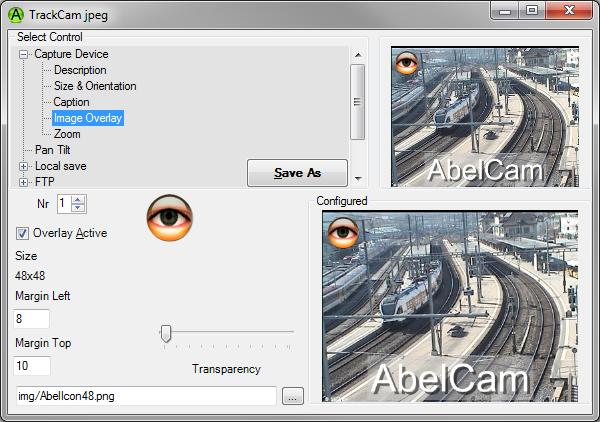
Nr: Select Image Number 1-4. Each overlay image can be configured independently from the others.

Overlay Active: check this to activate the overlay image

Size: this shows the size of the currently selected overlay image

Transparency: use this slider to set the transparency of the image. The left side shows image opaque. If your image has transparent parts (eg PNG images), they are shown transparent without this setting.

Overlay Image file name: enter the file name here, or use the (...) button to select an image

Image Position

To position the overlay image, click on the image.

When you see the crosshair cursor, you can move the image by moving the cursor.

Click to fix the overlay image position.

You may also enter the position in the following entry fields:

Margin Left: horizontal position

Margin Right: vertical position


Help Topics